
基础文件操作
文件操作
打开文件 open()
open() 函数用于打开一个文件,并返回一个文件对象。如果文件不存在,根据不同的模式,可能会创建新文件或报错。
file_object = open(file, mode='r', encoding=None)file: 必需参数,表示要打开的文件的路径(可以是相对路径或绝对路径)。mode:可选参数,表示文件的打开模式,默认为 ‘r’(只读文本)。encoding: 可选参数,指定文件的编码格式,对于文本文件非常重要。在处理中文时,通常使用 ‘utf-8’。file_object此时是open函数的文件对象,也就是C++中的类的实例化。
try:
    f = open("tt.txt",'r',encoding='utf-8')
    print(type(f))
    print(f)
except:
    print('Error')
# <class '_io.TextIOWrapper'>
# <_io.TextIOWrapper name='tt.txt' mode='r' encoding='utf-8'>
读写文件
读取文件
有多种方法可以从文件中读取内容:
read(size)
read(size): 读取指定大小(字节)的内容。如果省略 size 或为负数,则读取整个文件。
try:
    with open("tt.txt",'r',encoding='utf-8') as f:
        print(f"{f.read()}")
except:
    print('Error')
# hello,world!
readline()
readline(): 读取文件中的一行(直到换行符 \n)。
try:
    with open("tt.txt",'r',encoding='utf-8') as f:
        print(f"{f.readline()}")
except:
    print('Error')
# hello,
readlines()
readlines(): 读取所有行,并返回一个包含每行字符串的列表。
try:
    with open("tt.txt",'r',encoding='utf-8') as f:
        print(f"{f.readlines()}")
except:
    print('Error')
# ['hello,\n', 'world!'] readlines() 返回的列表中,每个字符串(除了最后一个,如果文件末尾没有换行的话)都会包含末尾的换行符 \n。
使用列表推导式 (List Comprehension) 可以快速简洁地删除所有空白字符。
可以在读取行的同时,对每一行应用字符串的 .strip() 或 .rstrip() 方法。
- .strip(): 移除字符串首尾的所有空白字符(包括空格、制表符 \t 和换行符 \n)。这是最常用的。
- .rstrip(): 只移除字符串末尾的空白字符。
# 创建一个示例文件
with open('data.txt', 'w', encoding='utf-8') as f:
    f.write("First line\n")
    f.write("Second line \n") # 注意末尾有空格
    f.write("  Third line with leading spaces\n")

# --- 使用 .strip() ---
try:
    with open("data.txt",'r',encoding='utf-8') as f:
        content = f.readlines()
        res = [line.strip() for line in content]
        print(res)
except:
    print('Error')

# ['hello,', 'world!']

# 如果你觉得列表推导式不太好理解,使用传统的 `for` 循环也能达到同样的效果。这种方式更明确,但代码稍长一些。
clean_lines = []
with open('data.txt', 'r', encoding='utf-8') as f:
    lines_raw = f.readlines()
    for line in lines_raw:
        clean_lines.append(line.strip())
直接迭代文件对象
直接迭代文件对象 (推荐): 这是最常用、最高效的逐行读取方式。
try:
    with open("tt.txt",'r',encoding='utf-8') as f:
        for i in f:
            print(i.strip())
except:
    print('Error')
# hello,
# world!
关闭文件
操作完文件后,务必关闭文件以释放系统资源。如果不关闭,可能会导致数据丢失或文件损坏。
基本语法:
file_object.close()示例:
f = open('example.txt', 'r', encoding='utf-8')
# ... 进行读写操作 ...
f.close()
print("文件已关闭。")推荐的方式:使用with open()语句
为了避免忘记调用 close(),推荐使用 with 语句来管理文件对象。with 语句会在代码块执行完毕后自动关闭文件,即使在代码块中发生异常。
with open('example.txt', 'r', encoding='utf-8') as f:
    # 在这个代码块中,文件 f 是打开的
    content = f.read()
    print("文件内容已读取。")
# 离开 with 代码块后,文件 f 会被自动关闭,无需手动调用 f.close()
print("文件已自动关闭。")
文件写入
使用 ‘w’ 模式打开文件会清空并覆盖原有内容。
-
write(string): 将指定的字符串写入文件。
content_to_write = "这是第一行。\n这是第二行。" with open('output.txt', 'w', encoding='utf-8') as f: f.write(content_to_write) print("内容已写入 output.txt (覆盖模式)。") -
writelines(list_of_strings): 将一个字符串列表写入文件(注意:不会自动添加换行符)。
lines = ["第一行\n", "第二行\n", "第三行"]
with open('output_lines.txt', 'w', encoding='utf-8') as f:
    f.writelines(lines)
print("多行内容已写入 output_lines.txt (覆盖模式)。")
追加写入
使用 ‘a’ 模式打开文件会在文件末尾追加新内容,而不会清空原有内容。
常用文件模式 (mode):
| 模式 | 描述 |
|---|---|
| ’r’ | **只读 **。默认模式。如果文件不存在,会抛出 FileNotFoundError。 |
| ‘w’ | 只写。如果文件存在,会覆盖原有内容;如果文件不存在,会创建新文件。 |
| ‘a’ | 追加 (Append)。如果文件存在,在文件末尾追加内容;如果文件不存在,会创建新文件。 |
| ‘x’ | 独占创建。如果文件已存在,会抛出 FileExistsError;如果不存在,则创建并以写入模式打开。 |
| ‘b’ | 二进制模式。可以与其他模式组合使用,如 ‘rb’ (只读二进制)、‘wb’ (只写二进制)。用于处理非文本文件,如图片、音频、视频等。 |
| ’+‘ | 读写模式。可以与其他模式组合,如 ‘r+’ (读写,文件必须存在)、‘w+’ (读写,覆盖或创建)、‘a+’ (追加读写)。 |
核心要点:
with open(...) as f:是处理文件的最佳实践。- 指定编码
encoding='utf-8'是处理文本文件(尤其是包含非英文字符)时的好习惯。 - 区分
'w'(覆盖) 和'a'(追加) 是写入文件时的关键。 - 读取时
for line in f:是逐行处理文件的最高效方式。 .strip()是处理从文件中读取的行时非常有用的字符串方法。
练习
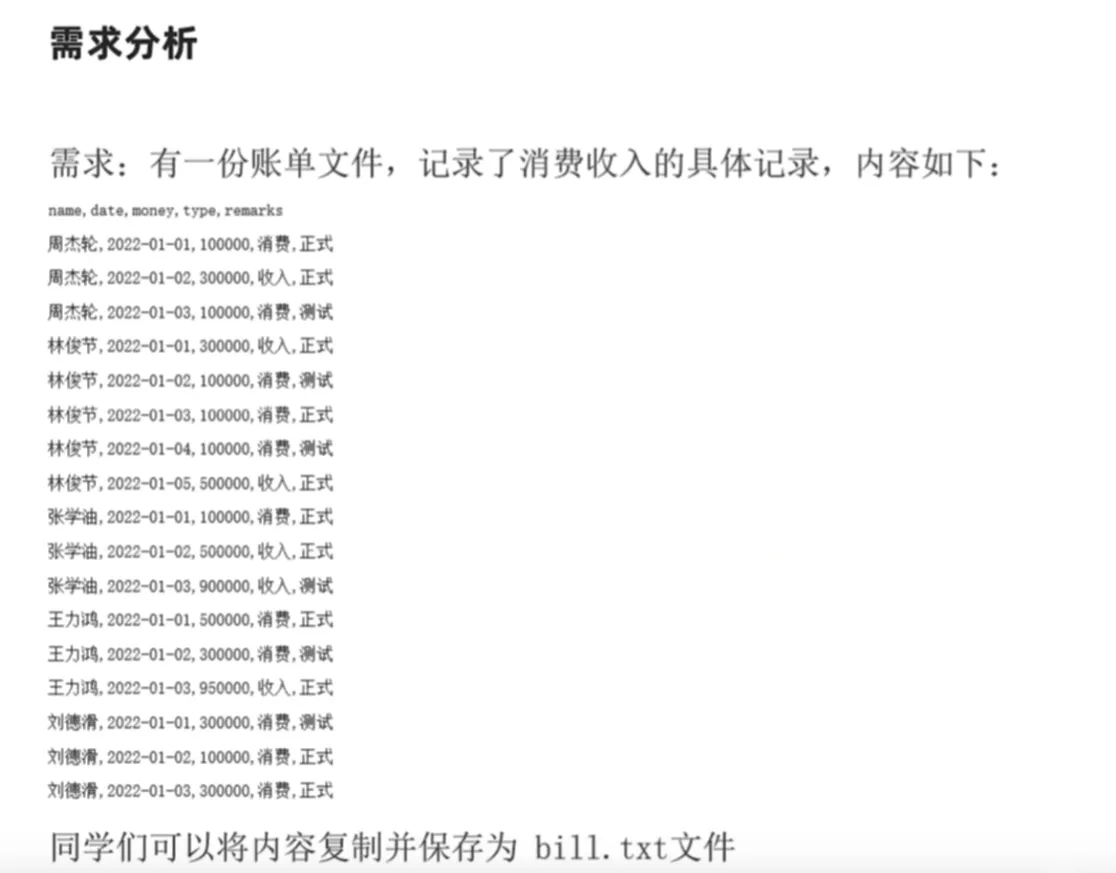
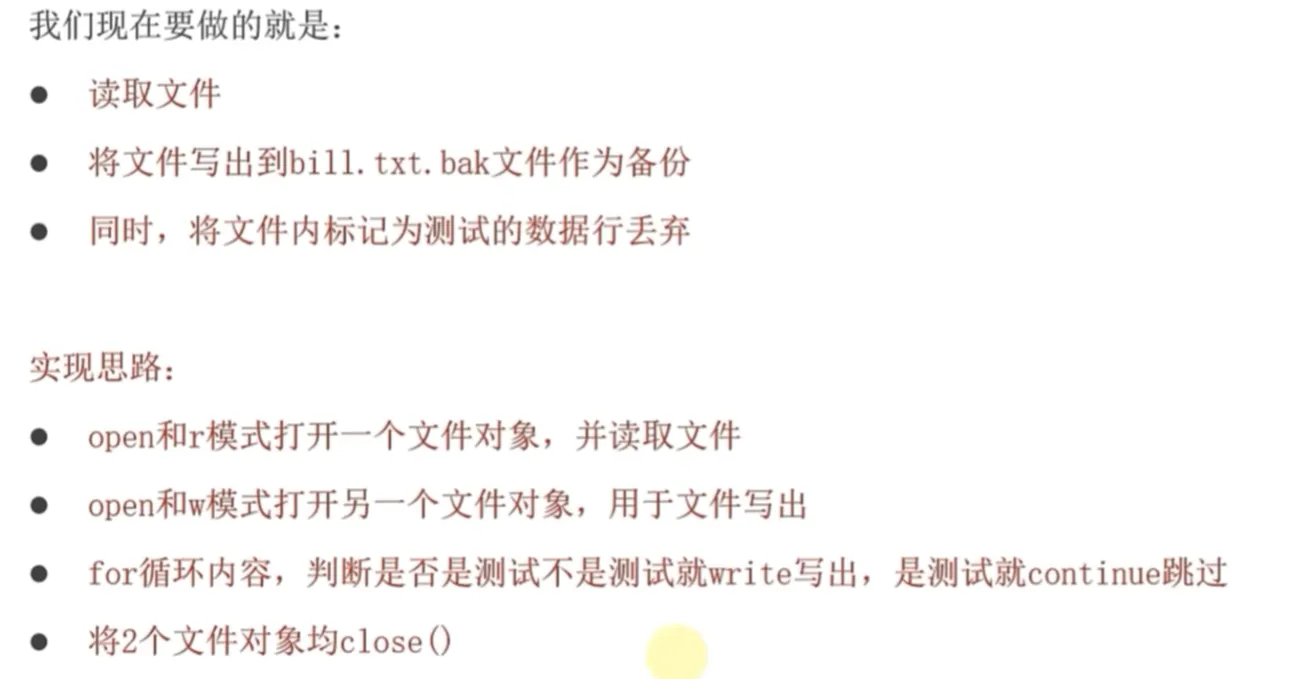
try:
    with open('file_excercise.txt','r',encoding='utf-8') as f:
        print('It is ok to open origin file.')
        with open('output_file.txt.bak','w',encoding='utf-8') as f2:
            f2.write('name,date,money,type,remarks\n')
            for i in f:
                line = i.strip()
                if line.endswith('正式'):
                    f2.write(i)
except:
    print('Error')

# name,date,money,type,remarks
# 周,2022-01-01,1000,消费,正式
# 周,2022-01-03,1001,消费,正式
# 周,2022-01-22,10004,消费,正式
# 林,2022-03-01,10006,消费,正式
# 张,2022-06-01,10090,消费,正式
# 李,2022-06-01,103300,消费,正式
# 李,2022-07-01,100220,消费,正式
# 王,2022-09-01,10020,消费,正式
# 刘,2022-10-01,100330,消费,正式